BrightOnCall Pro
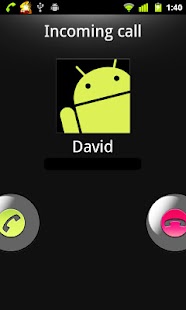
BrightOnCall solves your problem: while incoming call, it will change the bright level to maximum automatically.
BrightOnCall Pro is the full version of this app.
If you have tested BrightOnCall Lite and it has been useful for you, Pro version brings all these improvements:
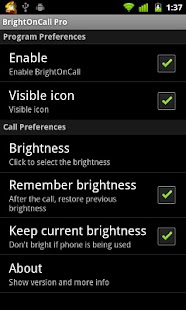
- You won’t need to reset the counter after 8 calls- Select the brightness level of your choice for incoming calls- When the call is finished, you can get back the brightness level set previously- Hide the status bar icon if you want to- You can choose not changing the brightness when the phone is being used- No ads
*** Warning: it is very important to have checked that Lite version works properly on your phone before buying Pro versión because if Lite version doesn´t work, Pro won’t either.
***
*** If you are going to install Pro versión, uninstall Lite versión first ***
*** Please, don’t move this app to SD card because it will work in a wrong way ***
Keywords: Bright, brightness, brightest, battery saving, torch, flashlight, brillo, aumentar brillo, linterna, batería, ahorrar batería, bateria, encender pantalla
About BrightOnCall Pro
- Package name (App ID)
- com.magsat.brightoncall
- Available on
- Google Play
- Price
- Free
- Version
- v1.0
Looking for the BrightOnCall Pro APK?
The safest way to get BrightOnCall Pro (com.magsat.brightoncall) on your Android device is to install it directly from Google Play — you'll always get the latest official version, automatic updates, and no risk of modified or infected APK files from third-party sites.
Shopping Features
Shop online and find the best deals.
Automotive
Manage and monitor your vehicle with smart features.
See BrightOnCall Pro in Action
Frequently Asked Questions
Is BrightOnCall Pro free?
Yes, BrightOnCall Pro is free to download and install on Android through Google Play.
How do I install BrightOnCall Pro on Android?
Open Google Play on your Android phone or tablet, search for BrightOnCall Pro or tap the Google Play button on this page, then tap Install. The app downloads and installs automatically.
What is com.magsat.brightoncall?
com.magsat.brightoncall is the App ID (package name) of BrightOnCall Pro on Google Play. Every Android app has a unique package name, and it is the safest way to verify you are installing the official app.
Is BrightOnCall Pro safe to download?
Installing BrightOnCall Pro from Google Play is the safest option: you get the official version, verified by Google Play Protect, with automatic updates. Avoid APK files from unofficial third-party sites.

Get BrightOnCall Pro Today
BrightOnCall Pro for Android — free download on Google Play.
Compatible with Android phones and tablets — available on Google Play.
Ask AI about this app
Get instant answers about features, tips and more from popular AI assistants.